
Computer use
Click, type, and capture the session desktop, and watch it live in your own product.
Every session is a full computer with its own desktop. Your agent can click, type, and take screenshots through the computer API, the same way it runs commands through exec. And with live streams, you can watch the desktop in real time or open an interactive terminal.
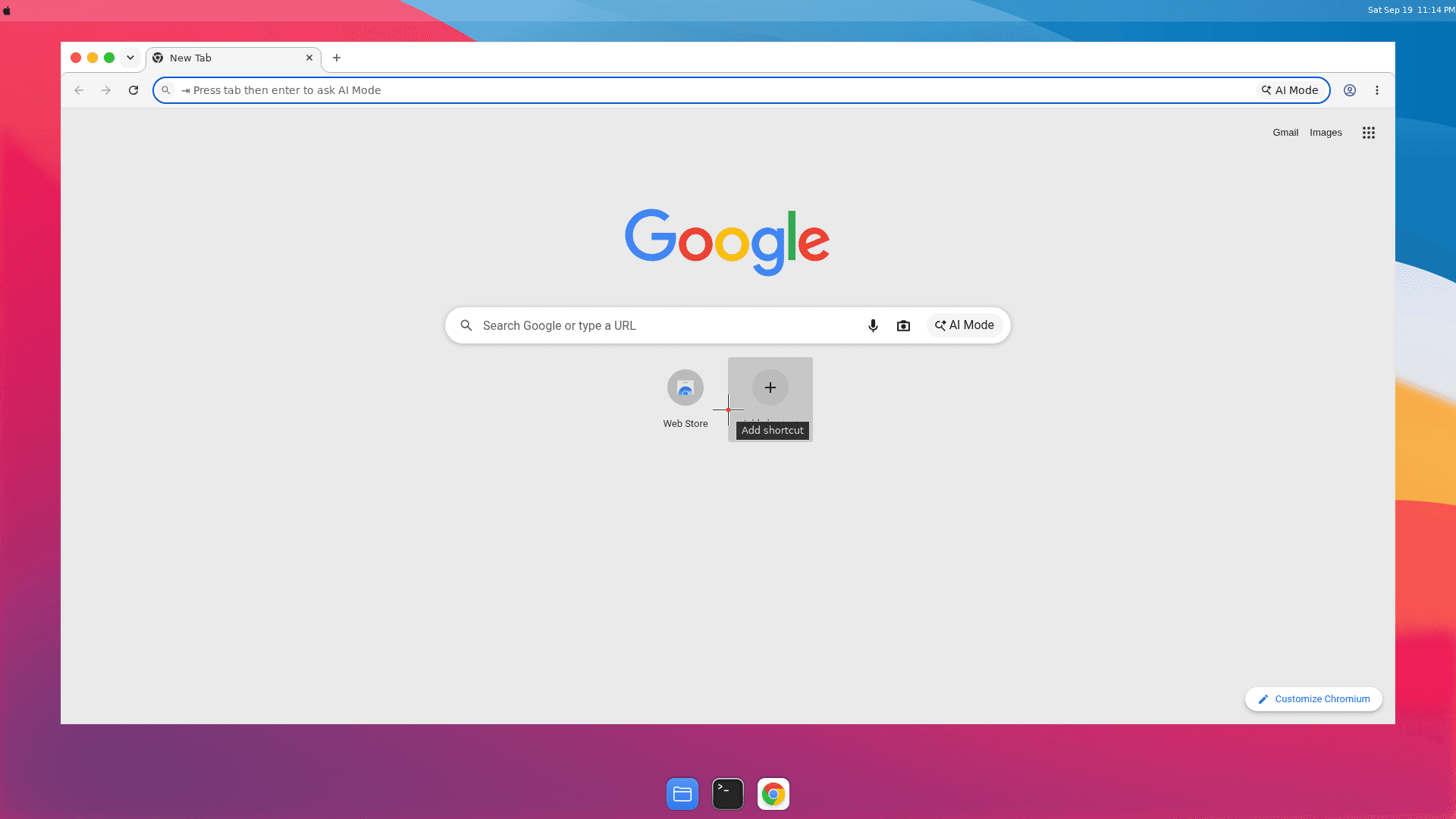
A real session desktop, captured with session.computer.screenshot().
Computer actions
POST /v1/sessions/{id}/computer performs one desktop action and returns its result. The desktop starts on first use; the session must be running. Actions run alongside commands and SSH without taking the session lease.
| Action | Input | Result |
|---|---|---|
screenshot | — | Base64 PNG with width/height |
click | x, y, button?, double? | acknowledgement |
move | x, y | acknowledgement |
drag | startX, startY, endX, endY, button? | acknowledgement |
scroll | x, y, direction, amount? | acknowledgement |
type | text | acknowledgement |
key | key, modifiers? | acknowledgement |
cursor_position | — | x, y |
display | — | width, height |
Key names are canonical: enter, escape, tab, letters, digits, and function keys, with modifiers ctrl, alt, shift, and cmd.
const session = await client.sessions.open({ name: "browser-task" });

const { width, height } = await session.computer.display();
await session.computer.click(Math.round(width / 2), Math.round(height / 2));
await session.computer.type("hello from my harness");
await session.computer.key("enter");

const shot = await session.computer.screenshot();
await fs.writeFile("desktop.png", Buffer.from(shot.data, "base64"));
The action shapes map one-to-one onto the tool inputs most computer-use models emit, so a harness can forward model tool calls directly. Coordinates are pixels from the top-left of the display reported by display.
Live streams
POST /v1/sessions/{id}/streams mints a single-use WebSocket grant:
{
  "id": "…",
  "type": "desktop",
  "url": "wss://…/v1/streams",
  "subprotocols": ["assemble.desktop.v1", "assemble.ticket.…"],
  "expiresAt": "2026-09-19T21:04:05.000Z"
}
Connect a WebSocket to url with exactly subprotocols, before expiresAt. The second subprotocol carries a signed single-use credential, so it never appears in URLs or request logs. expiresAt is a connect-by deadline; once connected, the stream stays open while the session runs and your ownership holds, and ends when the session pauses, stops, or is deleted.
Desktop streams
A desktop stream speaks the VNC remote-framebuffer protocol in binary WebSocket frames — point any noVNC-compatible client at it. The stream is interactive: viewing and input are the same capability your API key already grants.
import RFB from "@novnc/novnc/lib/rfb";

const access = await session.streams.desktop();
const rfb = new RFB(document.getElementById("screen"), access.url, {
  wsProtocols: access.subprotocols,
});
rfb.scaleViewport = true;
Terminal streams
A terminal stream is an interactive shell in /workspace using JSON text frames, made for xterm.js but usable from any WebSocket client.
Client frames: {"type":"input","data":"ls\n"} (up to 16 KiB) and {"type":"resize","cols":120,"rows":30}.
Server frames: {"type":"ready"}, {"type":"output","data":"…"}, {"type":"exit","exitCode":0}, and {"type":"error","message":"…"}.
import { Terminal } from "@xterm/xterm";

const access = await session.streams.terminal({ cols: 120, rows: 30 });
const socket = new WebSocket(access.url, access.subprotocols);
const terminal = new Terminal({ cols: 120, rows: 30 });
terminal.open(document.getElementById("terminal"));

socket.onmessage = (event) => {
  const frame = JSON.parse(event.data);
  if (frame.type === "output") terminal.write(frame.data);
  if (frame.type === "exit") terminal.write(`\r\n[exited ${frame.exitCode}]`);
};
terminal.onData((data) => socket.send(JSON.stringify({ type: "input", data })));
Closing the socket ends the shell; a terminal stream is never a detached process. For long-lived processes, use executions or SSH.
Security model
- Tickets are single-use, expire within a minute, and are signed with a service key separate from API keys.
- Your authority is re-checked continuously while connected; losing the session (deletion, pause, ownership change) closes the stream within seconds.
- Streams grant nothing your API key does not already grant — they are a transport, not a new permission. Treat a minted grant like any other credential and pass it straight to the viewer that will connect.
- If the operator has not configured stream ticketing, minting returns
streams_not_configured. On a service whose VM environment lacks desktop software, computer actions and desktop streams fail withdesktop_unavailable; terminal streams work regardless.
Where this fits
Use computer actions when your harness drives the desktop as agent tools. Use a desktop stream to show people what the agent is doing, or to take over by hand. Use a terminal stream for an embedded interactive shell without issuing SSH credentials. All three work on the same session, alongside exec, files, and SSH.